

SSL monitoring watches your TLS certificates and alerts you well before they expire. It also catches chain errors, expired certs, and other cases where a browser would refuse to trust the connection — all the silent failures that can take a site down the moment a client gets strict.
Why it's its own monitor
An uptime monitor against an HTTPS URL will tell you the moment your certificate expires. That's already too late — by the time the uptime alert fires, every visitor is hitting a browser warning.
An SSL monitor gives you weeks of warning. It fires at configurable day thresholds before expiry (30, 14, 7 and 1 day by default) so you get four separate chances to notice and renew before the cert actually lapses.
What the checker does
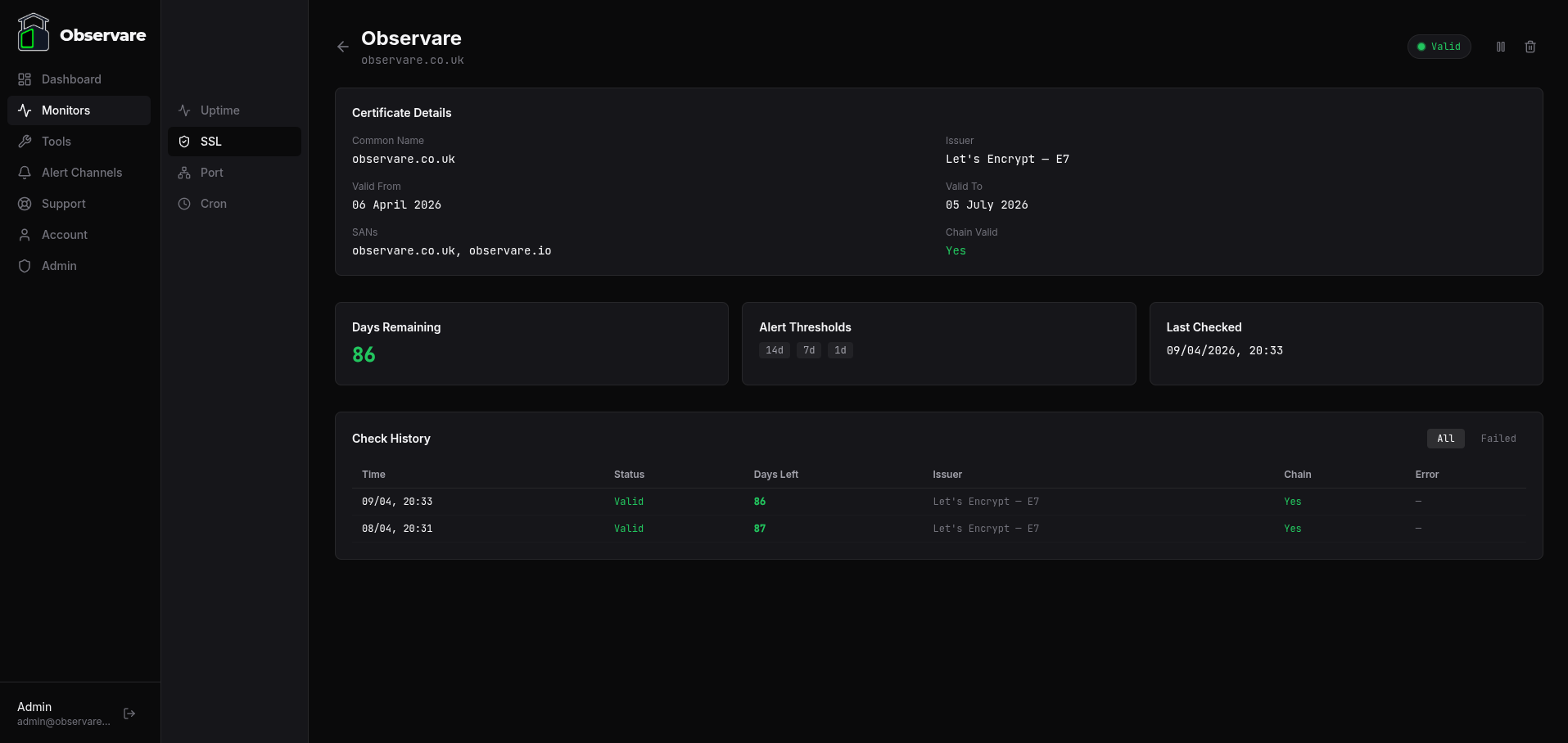
For every SSL monitor, Observare opens a raw TLS connection to hostname:port once a day and reads the certificate the server presents. This is a real handshake, not a lookup against CT logs — the only thing that tells you what visitors actually see on port 443 is an actual TLS connection.
The checker captures:
- Issuer — the CA organisation and common name that signed the cert (e.g.
Let's Encrypt — R3) - Common name — the subject CN of the leaf cert
- SANs — all
subjectAltNameDNS entries on the cert - Valid from / valid to — the certificate's
notBeforeandnotAfterdates - Days remaining — how many whole days until the
notAfterdate - Chain valid — whether the full chain authenticates against Node's trusted root store (SNI-aware)
The TLS connection uses SNI with the configured hostname as the server name, so it correctly resolves the right cert on hosts serving multiple certificates from the same IP. The connection times out after 15 seconds.
Creating a monitor
Go to Monitors → SSL → Add monitor and fill in:
- Name — a human-friendly label, 1–100 characters.
- Hostname — the hostname to check, e.g.
example.comorapi.example.com. Up to 253 characters. - Port — TCP port to connect on. Defaults to
443. Override for mail (465, 993), LDAP (636), or any custom TLS endpoint. - Alert thresholds — four predefined checkboxes: 30 days, 14 days, 7 days, and 1 day before expiry. All four are enabled by default. Untick any you don't want to be warned at.
- Alert channels — which of your configured alert channels should receive the alerts.
Save and Observare runs the first check within a few minutes. After that the monitor checks once every 24 hours.
servername set to the hostname you configured. If your server presents a different cert depending on SNI (common on shared IPs), make sure the configured hostname matches the cert you actually want to watch.
How alerts are fired
SSL alerts are threshold-based, not repeated. Each threshold fires exactly once per certificate. Observare tracks which thresholds have already fired for a given cert in the database (thresholds_fired), so you get one email at 30 days, another at 14 days, another at 7, and another at 1 — never duplicates.
When the certificate is renewed (Observare detects that days_remaining has jumped above the highest threshold that has already fired), the fired-thresholds list is cleared. The next time a threshold is crossed against the new cert, the cycle starts again.
If the cert becomes invalid — expired, untrusted chain, or any other hard failure — Observare fires an SSL Invalid alert (again, once per bad state). When the cert becomes valid again, you get an SSL Renewed recovery alert.
Monitor status
An SSL monitor's status is one of:
| Status | Meaning |
|---|---|
valid |
Cert is authenticated and has more than 7 days remaining |
warning |
Cert is authenticated but expires within 7 days |
critical |
Cert is authenticated but expires within 1 day |
invalid |
Cert is expired, the chain is untrusted, or the handshake failed |
paused |
Monitor is paused — no checks running |
pending |
Monitor was just created or resumed — no check has completed yet |
Failure categories
When an SSL check fails, the failure is classified into one of these types:
| Error type | When it fires |
|---|---|
expired |
Certificate's notAfter date is in the past |
invalid_chain |
TLS handshake completed but the chain doesn't validate against a trusted root, hostname doesn't match, or similar |
no_certificate |
Server completed the handshake but presented no peer certificate |
parse_error |
Certificate was present but Observare couldn't parse it |
timeout |
TLS connection didn't complete within 15 seconds |
dns_failure |
DNS lookup for the hostname failed (ENOTFOUND) |
connection_refused |
Server refused the TCP connection on the specified port (ECONNREFUSED) |
connection_failed |
Any other low-level connection error |
The raw error message is recorded alongside the category so the monitor detail page can show you exactly what went wrong.
The three alert types
SSL monitors can send three different alerts depending on what happened:
- SSL Expiry Alert (
[SSL EXPIRY]) — fired when days-remaining crosses a configured threshold. Subject line includes the days remaining. - SSL Invalid Alert (
[SSL INVALID]) — fired when a previously valid cert becomes invalid or fails the handshake, or when a new monitor's first check is already failing. Fires once per invalid state. - SSL Renewed Alert (
[SSL RENEWED]) — fired when a previously invalid monitor comes back to valid. Acts as the recovery signal for an invalid-state alert.
Every alert lists the hostname, port, issuer, expiry date, and days remaining so you can triage without logging in.
Pausing a monitor
Open an SSL monitor and click Pause to stop it being checked. Click Resume to bring it back — the status resets to pending until the next check completes. Pausing is useful if you're intentionally taking a host offline for a while and don't want the daily check turning up invalid.
History and retention
Every check is stored with its full result — issuer, SANs, valid-from/to, days remaining, error if any. The check history is shown on the monitor's detail page.
Checks older than 90 days are automatically deleted to keep the database from growing unbounded.
Account limits
Each account can have up to 30 SSL monitors. The cap is independent of your uptime, port and cron monitors — you can run 30 SSL monitors alongside 30 of each other type on the same account.
Why it's bundled with uptime
Almost every uptime monitor in the real world should have a paired SSL monitor for the same host. Running them in separate SaaS products means paying twice and having alerts arrive from two different inboxes. Observare bundles them so a single £5/month subscription covers both.
What's next
- Uptime monitoring — pair your SSL monitor with an HTTPS uptime check.
- Port monitoring — for non-HTTP services behind TLS.
- Setting up alert channels — connect a channel so your 30-day warning actually reaches you.