

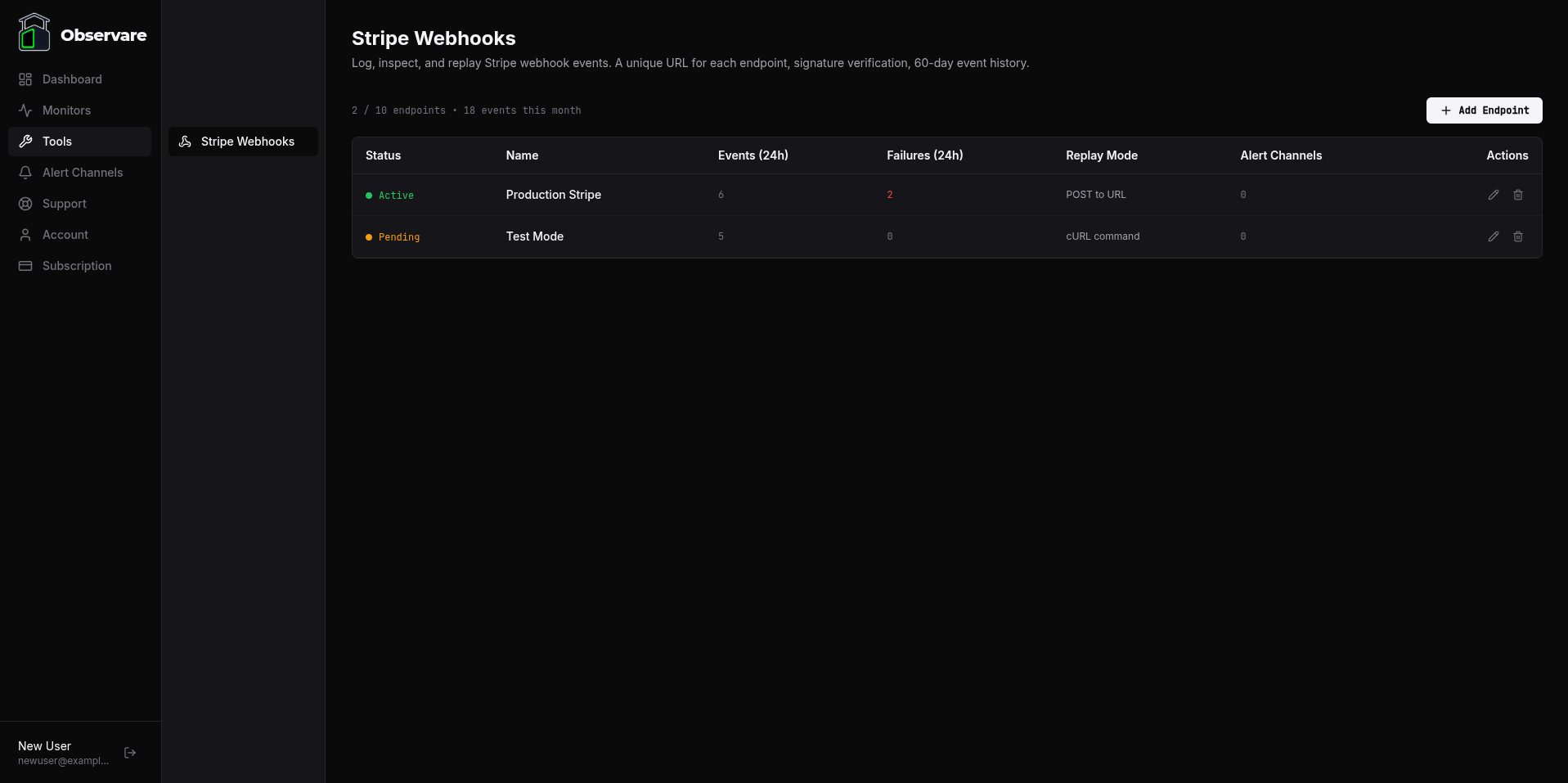
The Stripe Webhooks tool is a capture, inspect, and replay pipeline for Stripe webhook integrations. It sits between Stripe and your own endpoint (optional), verifies every event's signature, stores the full request — headers and body — and lets you re-send any historical event to a dev or staging URL with a fresh signature. When something goes wrong in the middle of the night it gives you the full record of what Stripe actually sent, how your endpoint responded, and a one-click way to replay the event once you've deployed a fix.
The problem it solves
Stripe webhooks are usually the first thing to go wrong in any Stripe integration and the last thing you think to log properly. You ship a checkout flow, Stripe sends a checkout.session.completed, your handler throws a 500, Stripe retries a few times over three days, gives up, and now you have a paying customer with no record of the payment in your database.
The textbook fixes are either:
- Log every webhook request server-side yourself (tedious boilerplate that everyone skips).
- Dig into the Stripe dashboard to find and manually resend the missing event (slow, and only shows Stripe's side).
The Observare webhook logger is the middle ground. Every webhook lands in a persistent event log you can search, filter, and inspect. Every event can be replayed with a fresh valid signature against any URL you configure. And you get push alerts if signature verification starts failing so you know about rotated secrets before your production drops events on the floor.
How the two-step setup works
Setup has a deliberate chicken-and-egg dance because Stripe generates the signing secret after you register the endpoint URL with them, but Observare needs that secret to verify signatures. The flow is:
- Create the endpoint in Observare. Give it a name, pick a replay mode, optionally set a replay URL, and save. Observare generates a unique public receiver URL for you.
- Register that URL in Stripe. In the Stripe dashboard, create a webhook endpoint and paste the Observare URL. Stripe gives you a signing secret that starts with
whsec_. - Paste the signing secret back into Observare. The endpoint transitions from
pendingtoactiveand signature verification kicks in immediately on the next event.
The endpoint is usable at step 2 — Observare accepts events the moment the URL exists — but without a signing secret every event lands with signature_verified = null in the log, marked "pending setup". As soon as the secret is in place, verification runs on every future event.
Creating an endpoint
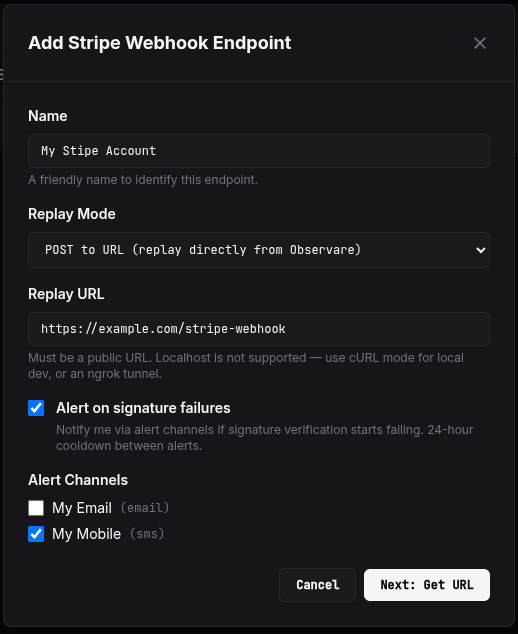
Go to Tools → Stripe Webhooks → Add endpoint. The create form has the following fields:
- Name — a human-friendly label for this endpoint, e.g.
Production StripeorTest mode. 1–100 characters. - Replay mode — how this endpoint's events can be replayed. One of:
url(default) — replays POST the stored payload to a configured destination URL.curl— replays generate a copy-pasteablecurlcommand instead of firing the request from the server.disabled— replay is turned off entirely for this endpoint.
- Replay URL — only shown when replay mode is
url. The destination that Observare willPOSTthe replay to. Up to 500 characters, must be a valid URL. - Alert me on signature failures — a checkbox that opts this endpoint into the sig-fail alert worker (see below).
- Alert channels — any of your configured alert channels that should receive the sig-fail alert.
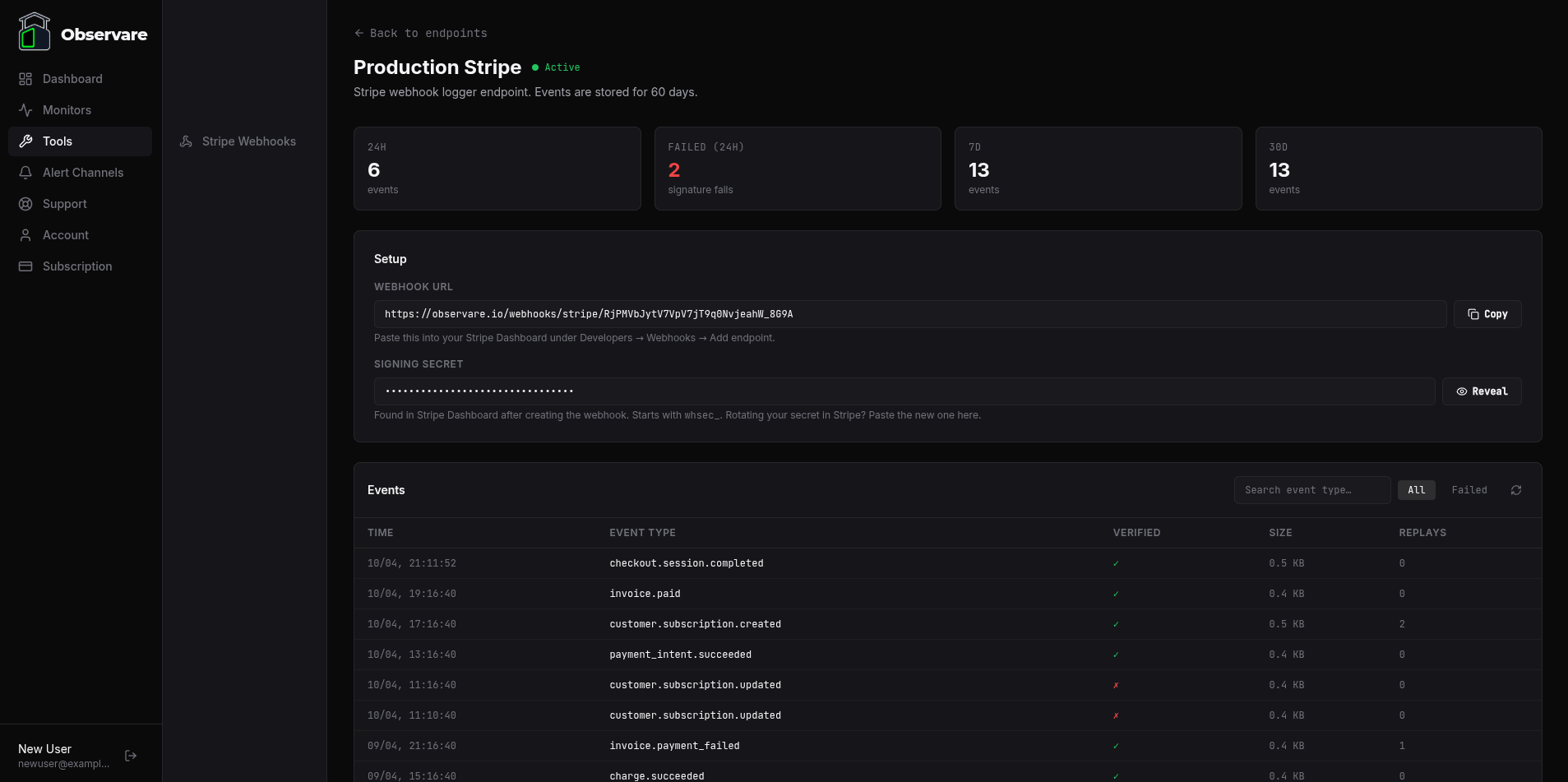
Click Next: Get URL and Observare generates the endpoint + the receiver URL. Copy the URL — this is what you paste into the Stripe dashboard.
The receiver URL
The receiver URL has this shape:
https://observare.io/webhooks/stripe/<token>The token is a 32-character random string generated at endpoint-creation time. It is the only authentication on the receiver — treat it like a secret, don't commit it anywhere public, don't paste it in chat channels you don't control.
The receiver accepts:
- POST only — anything else is rejected.
- Up to 2 MB body size — Stripe events are typically a few KB but can exceed the default 1 MB limit during bulk operations, so we raised the ceiling.
- Up to 300 events per minute per token — above that the receiver returns
429 Too Many Requests. This is high enough that legitimate Stripe traffic will never hit it, even during bulk subscription renewals, but it caps runaway retry loops.
Every request that comes in is stored in the event log, whether or not the signature verifies — you always see the full record, even for broken events.
Registering the URL in Stripe
In the Stripe dashboard:
- Go to Developers → Webhooks → Add endpoint.
- Paste the Observare receiver URL as the endpoint URL.
- Pick the events you want Stripe to send. While debugging it's often easiest to select "listen to all events".
- Save. Stripe generates a signing secret starting with
whsec_. - Copy the signing secret.
Back in Observare, open your endpoint's detail page and paste the signing secret into the Signing Secret field. Save. The endpoint flips from pending to active and the next event arriving on the receiver URL will be verified against that secret.
What gets stored per event
For every event that arrives on the receiver URL, Observare records:
| Field | Where it comes from |
|---|---|
| Received at | Server clock at the moment the event hits the receiver |
| Source IP | The remote address of the incoming HTTPS request |
| Headers | All request headers, with Authorization, Cookie, Set-Cookie, and Proxy-Authorization redacted |
| Raw payload | The exact JSON body Stripe POSTed — stored byte-for-byte |
| Payload size | Byte count of the raw body |
| Event type | Extracted from the JSON body's type field (e.g. checkout.session.completed) for list display and filtering |
| Provider event ID | Extracted from the JSON body's id field (e.g. evt_1NX...) for deduplication |
| Signature verified | true if HMAC-SHA256 verification passed, false if it failed, null if the endpoint had no secret configured when the event arrived |
| Signature error | The error message from the Stripe SDK if verification failed (e.g. "No signatures found matching the expected signature") |
The event type and provider event ID are extracted from the body but are not trusted — Observare only uses them for the UI label and the dedup key. All actual verification happens against the raw bytes and the signing secret.
Sensitive header redaction
Observare strips the following headers before storing any event, so they never appear in the event log or in replays:
AuthorizationCookieSet-CookieProxy-Authorization
This matches what Stripe's official event samples include — Stripe never sends these on real webhooks — but it means the log stays safe to share internally even if something weird sneaks past.
Deduplication
Each endpoint has a partial unique index on (endpoint_id, provider_event_id). If Stripe retries an event that Observare has already stored (same evt_... ID), the receiver recognises the duplicate, returns 200 OK { dedup: true }, and does not create a second row. Stripe treats the 200 as delivered and stops retrying.
This is per-endpoint: the same event arriving on two different endpoints produces two separate log entries (which is the right thing — different endpoints typically mean different downstream processors).
Signature verification
When the endpoint has a signing secret configured, every incoming event is verified using Stripe's own SDK (stripe.webhooks.constructEvent) against the raw body and the Stripe-Signature header. This is pure HMAC-SHA256 — the Stripe SDK is instantiated with a placeholder API key because verification is cryptographic and doesn't call Stripe's API.
Verification outcomes:
verified = true— the signature matched. The event is green in the log.verified = false— the signature did not match. The event is still stored, marked as a failure, and shown in red in the log with the raw error message. The receiver still returns200 OKto Stripe, because returning4xxwould make Stripe retry the same broken event for three days — pure noise. You fix the secret on your side, the next event verifies, and the pipeline resumes.verified = null— the endpoint had no signing secret configured when the event arrived. The event is stored and shown as "pending setup" in the log.
The event log
The endpoint detail page has a paginated event log showing up to 50 events per page (configurable up to 200). Each row shows the received time, event type, signature verification result, payload size, source IP, and replay state.
Filters: All events / Failed only.
Search: free-text filter on event type — type subscription to see all customer.subscription.* events, or invoice.paid to zero in on one specific type.
Event ordering: newest first, by received time.
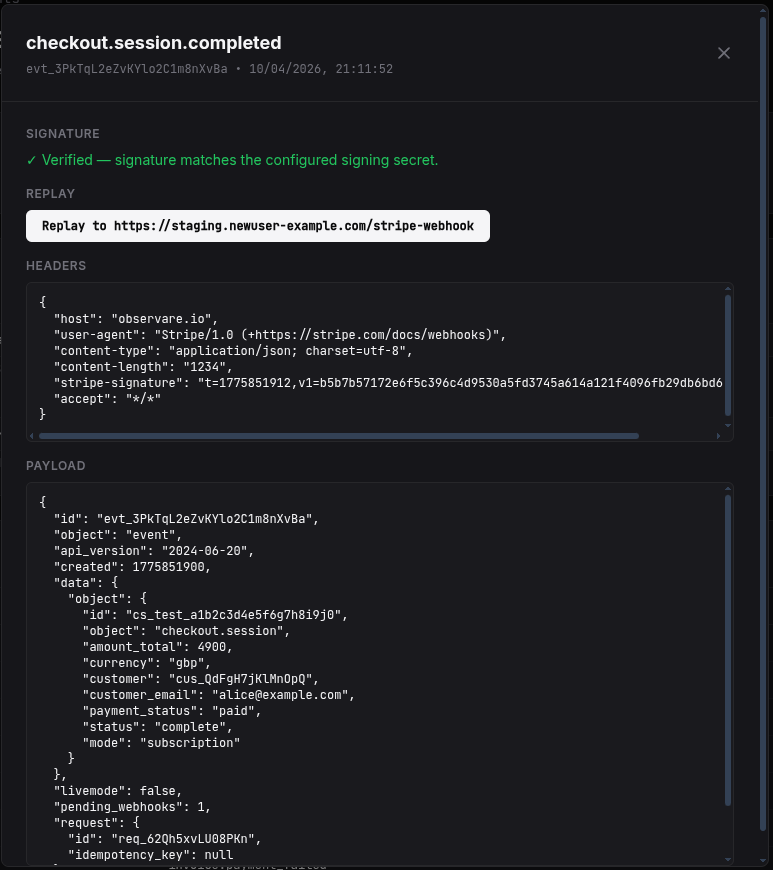
Clicking an event opens a detail view with three panels:
- Signature — verified / failed / pending status with error message if any.
- Headers — the JSON-serialised headers that came in (with sensitive ones redacted).
- Payload — the raw JSON body, pretty-printed.
And, depending on the endpoint's replay mode, a Replay panel.
Replay
The replay engine re-sends a stored event to a destination of your choice, with a freshly-computed Stripe-Signature header using the current timestamp. This is important: you cannot re-use the original Stripe-Signature header because Stripe's signatures include a timestamp and have a default 5-minute tolerance window, so replays would be rejected by any strict verifier.
Observare signs the stored payload with HMAC-SHA256 using your configured signing secret and ${now}.${payload} as the signed string. The result is a valid Stripe-Signature header that will verify successfully in any Stripe SDK.
Replay always requires a signing secret. An endpoint in pending state cannot replay anything because there's nothing to sign with. You'll see the "Signing secret required for replay" warning next to the Replay button in that state.
Replay is per-event, not per-endpoint batch, and every replay increments the event's replay_count so you can see from the list how many times an event has been re-sent.
URL mode
The default. Click Replay and Observare POSTs the stored payload to the configured replay URL with a fresh Stripe-Signature header and a 10-second timeout. It records:
- HTTP status code returned by the destination
- A 500-character snippet of the response body (in case of non-2xx, so you can see the error)
- Any network error
- The replay count and last-replay timestamp
URL replay has an SSRF guard. The replay URL must resolve to a public IPv4 address before the request is made — private ranges (10/8, 172.16/12, 192.168/16, 127/8, 169.254/16 — which blocks cloud metadata endpoints like 169.254.169.254), loopback, and link-local addresses are all rejected with an error. IPv6-only destinations are not supported. This is specifically to stop the replay engine from being turned into a tool for hitting internal services from the Observare host.
cURL mode
If you'd rather run the replay from your own machine (e.g. to hit a local dev server on localhost:3000, which URL mode can't reach), pick cURL mode. Clicking Generate cURL command produces a ready-to-run command with the fresh signature header already filled in. Copy it, paste it into your terminal, done.
The generated command looks like this:
curl -X POST 'https://staging.yourapp.com/stripe-webhook' \
  -H 'Content-Type: application/json' \
  -H 'Stripe-Signature: t=1712345678,v1=abc123...' \
  --data-raw '{"id":"evt_...","type":"checkout.session.completed",...}'
The payload is shell-quoted so internal quotes survive the copy/paste. The destination URL in the command is the endpoint's configured replay URL (or a placeholder if none is set).
Disabled mode
Replay is turned off for this endpoint. The event detail view hides the replay panel entirely. Useful for production endpoints where you don't want an accidental button-click re-posting to a live URL.
Signature failure alerts
Each endpoint has an opt-in Alert me on signature failures checkbox. When that's on:
- Observare tracks a
sig_fail_stateflag per endpoint. It flips to 1 the moment a single event fails signature verification. - The alert worker runs every 5 minutes. When it sees an endpoint in the failed state, it sends a push alert via the channels you've assigned.
- The alert includes the count of failed events in the last hour so you can gauge how bad the breakage is.
- After an alert fires, the endpoint enters a 24-hour cooldown — the worker will not re-alert for the same endpoint within 24 hours, regardless of how many more events fail.
- When the next verified event arrives,
sig_fail_stateflips back to 0 automatically. There is no "sig-fail recovered" alert — recovery is silent.
Subject line: [SIG FAIL] {endpoint name} — Stripe Webhook.
The most common cause of sig-fail storms is rotating the Stripe webhook secret without updating it in Observare, followed by accidentally pasting the wrong secret. The alert gets you moving before Stripe's 3-day retry window silently drops a chunk of your event traffic.
Endpoint status
An endpoint has one of three statuses:
| Status | Behaviour |
|---|---|
pending |
Endpoint has been created but no signing secret has been set. Events are received and stored, but signature_verified = null. Replay is disabled until a secret is set. |
active |
Signing secret is set. Events are verified and the full pipeline is live. |
disabled |
The receiver accepts incoming POSTs with a 200 OK but drops them — nothing is stored, nothing is verified, nothing is alerted on. Use this when you want to temporarily stop Observare handling events for an endpoint without deleting it (so Stripe doesn't retry, and your token/configuration is preserved). |
Going from pending to active happens automatically the moment you paste a valid signing secret into the endpoint. Going to disabled is manual from the detail page.
Revealing the signing secret
Signing secrets are treated as true secrets by the app: the normal list and detail APIs return signing_secret_set: true | false, not the actual value. To see the stored secret, there's a dedicated Reveal button on the endpoint detail page that hits a separate API endpoint and shows the secret inline. Clicking Hide returns it to the hidden state.
This is deliberate — it means a casual glance at the endpoint list can't leak the secret, and any accidental screenshot of the main UI doesn't contain it either.
Monthly event volume
The Stripe Webhooks page shows your monthly event volume against a soft cap of 100,000 events per month per account. This is a warning, not a block — Observare will keep storing events above the cap, but you'll see a flag in the monthly volume stats telling you you've gone over. If your monthly volume regularly exceeds this you probably want to talk to us about whether we need to move you onto a different plan.
Retention and limits
- Event retention: events older than 60 days are automatically deleted once a day.
- Endpoint limit: each account can have up to 10 webhook endpoints. This is lower than the monitor limits because realistically you only need one per Stripe mode (live + test) or one per environment — 10 is already generous.
- Soft monthly volume cap: 100,000 events/month per account (warning flag, not enforced).
What's next
- Setting up alert channels — connect Email or SMS so the sig-fail alerts reach you.
- FAQ & troubleshooting — common webhook debugging questions.